

Table of Contents
With online shopping becoming the norm, protecting your Magento eCommerce store from hackers is vital to keeping your business and customers safe. In this article, we will discuss the built-in security features Magento 2 has to offer. We will also provide the best practices for securing a Magento store.
Magento’s Key Security Features
Magento provides a solid foundation for safeguarding your online store by offering features like:
- User Authentication & Authorization
This feature ensures that only the right people can access your store’s backend. It checks usernames and passwords and allows you to control who has permission to make changes or view sensitive information.
- Data Encryption
Magento encrypts sensitive information, like customer details and payment data, when it’s being transferred online. This makes it harder for hackers to intercept and steal the data.
- Regular Security Updates
Magento frequently releases updates and security patches to fix weaknesses and keep your store safe from new types of attacks. Installing these updates regularly is important to stay protected.
- Secure Payment Processing
Magento meets strict PCI DSS standards, which are rules designed to make online payments safe. This means your customers’ payment information is handled securely and kept private.

- Role-Based Access Control
This feature lets you control who can do what in your store. For example, a marketing team member might only need access to product pages,
- Security Monitoring & Auditing
Magento helps you keep an eye on your store’s security by providing tools to check for unusual activity, potential threats, or weak spots. If something goes wrong, these tools make it easier to find and fix the problem quickly.
- Backup & Recovery
In case of an emergency like a hack, server crash, or accidental deletion, Magento’s backup features allow you to save and restore your store’s data. This ensures you can recover quickly without losing important information.
The above built-in features give you a strong starting point to protect your Magento store and your customers’ data.
Best Security Practices to Protect Your Magento Store
Always Update to the Latest Version
Keeping your Magento platform updated is one of the simplest and most effective ways to ensure security. Each new version or patch addresses known vulnerabilities and introduces features to better protect your Magento store. Hackers often exploit outdated systems, so staying current minimizes these risks. Regular updates also bring performance improvements and bug fixes.
Enable Two-Factor Authentication (2FA)
Two-factor authentication (2FA) adds an extra layer of protection by requiring 2 forms of verification. After entering your password, one will also need a one-time code sent via SMS, email, or an authenticator app. This means that even if someone steals your password, they can’t access your admin panel without the second factor. Thus, it is recommended that 2FA is enabled to protect against unauthorized logins, phishing attacks, and keylogging software.

Use SSL/HTTPS for Encryption
SSL (Secure Sockets Layer) ensures that all data transferred between your website and your customers is encrypted and hence safe from interception. This is critical for protecting sensitive information like login credentials and payment details. The SSL certificate also triggers the “padlock” icon in browsers and the HTTPS prefix in your URL, which helps to build customer trust. Additionally, it’s a requirement for PCI-DSS compliance when handling credit card transactions.
Set Strong, Unique Passwords
Weak passwords are one of the easiest ways for hackers to gain unauthorized access. Thus, avoid using common passwords like “admin,” “password,” or predictable patterns like “123456.” Instead, create passwords that are at least 12 characters long, with a mix of uppercase and lowercase letters, numbers, and special characters. It is also highly recommended to change passwords on a regular basis and avoid reusing them across different accounts.
Change the Default Admin URL
Magento’s default admin URL is /admin, making it an easy target for automated bots and brute-force attacks. By changing it to something unique (e.g., /unique-magento-store), you make it more difficult for attackers to find your admin login page. This is a simple yet effective way to improve security.

Enable reCAPTCHA
reCAPTCHA helps distinguish between real users and bots. It reduces spam submissions, prevents automated login attempts, and protects against brute-force attacks. Magento supports various reCAPTCHA options, including the “I am not a robot” checkbox and invisible verification that works in the background. There are also improved reCaptcha extensions, which will enhance security while keeping your store user-friendly.

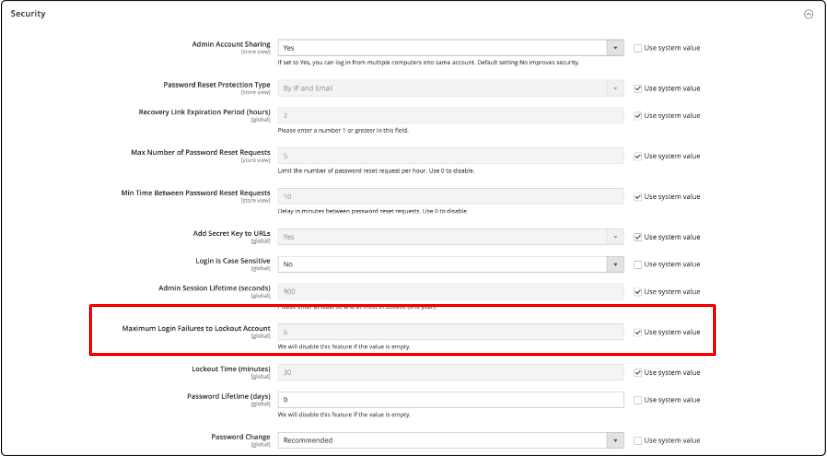
Limit Login Attempts
Prevent brute-force attacks by limiting the number of failed login attempts. This feature locks out users after a specified number of incorrect password attempts, making it harder for hackers to gain access. Configure this in your admin panel under the security settings.
Set Proper File and Folder Permissions
Setting proper Magento 2 permissions ensures that only authorized users or processes can access or modify your store’s critical files. Improper permissions, on the other hand, can expose sensitive files to hackers or malicious scripts.
Define User Roles and Permissions
Magento allows you to assign specific roles and permissions to different users. For instance, a marketing manager doesn’t need access to backend development settings. By restricting permissions, you minimize the risk of accidental errors or malicious actions. Hence, review and update roles regularly to ensure only the right people have access.

Regularly Backup Your Data
No matter how secure your store is, unforeseen issues like hacks, hardware failures, or human errors can happen. Therefore, one needs to schedule regular backups of the entire site, including databases, media, and configuration files. These backups should be stored in an external location, such as cloud storage or an offsite server, to ensure you can recover quickly in case of data loss.
Whitelist Trusted IPs
By using .htaccess or server configuration settings, one can restrict admin panel access to specific, trusted IP addresses. This means only users from approved IP addresses can access sensitive areas, adding an extra layer of security.
Use Trustworthy Extensions Only
Extensions add functionality to your Magento store, but poorly coded or outdated ones can introduce vulnerabilities. Always download extensions from reputable sources like the Magento Marketplace. Also, keep all installed extensions updated and disable or remove ones you no longer use.
Set Up a Firewall
A firewall acts as a barrier between your website and potential threats. It monitors and blocks malicious traffic, preventing SQL injection, cross-site scripting (XSS), and other attacks. Magento-compatible web application firewalls (WAFs) are easy to integrate and provide robust protection for your store.
Use Security Enhancing Extensions
Another important recommendation is to consider using extensions that are built to protect your Magento store, such as, for example, Improved Admin Security modules.
Conclusion
Securing a Magento store requires staying proactive. Regular updates, strong passwords, and basic best practices can prevent most attacks. Combine these steps with Magento’s built-in features to protect your business and customer data effectively.





Leave a Reply